The Realism Trap in Virtual Worlds
The realism trap in virtual worlds can bury useful cues. Learn to balance sight, sound, touch, and interaction so visitors can read a scene with ease.
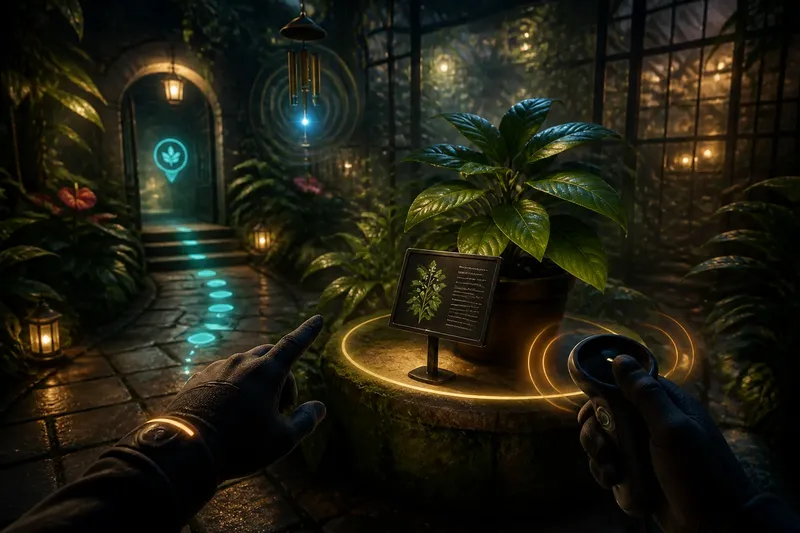
You step into a virtual forest and hear insects near your ear, feel a controller pulse, and spot a bright butterfly drifting away from the path. The realism trap in virtual worlds is not simply too much detail; it is a clash between signals competing across sight, sound, and touch.
Separate the signal channels
Visitors read a scene through several channels at once. Visual contrast can mark a doorway, spatial audio can suggest a stream behind a wall, and controller vibration can confirm that an object has been selected. Each cue may work on its own and still become confusing when several arrive together.
Map the scene’s important signals by channel and purpose. A route cue might use a distinct floor pattern, while a short sound confirms that a gate opened. If both demand attention at the same moment, let one lead and make the other quieter, later, or optional.
Give cues distinct jobs
Assign each prominent cue a specific role: orient, warn, invite interaction, or establish atmosphere. A glowing edge could identify an object that can be handled; a low ambient hum could suggest machinery beyond the room. Avoid using the same visual treatment for both a decorative prop and a required control.
Consider cue combinations, not just individual effects. A floating arrow, spoken direction, and controller buzz that all point toward the same doorway may feel less like clarity than a chorus of interruptions. Keep the clearest signal, then use supporting cues only when they add a different kind of information.
Control cue timing
Timing can make a useful signal easier to read. A gentle pulse that begins after a visitor enters a room can invite attention without competing with the initial view. A confirmation sound can follow a selection rather than overlap the instruction explaining what to select.
Use pauses between events that ask for a response. If a voice prompt, animated marker, and vibration arrive together, a visitor may not know which one matters. Stagger them so the prompt guides attention, the marker identifies the target, and the vibration confirms the completed action.
Plan sensory alternatives
Do not make an essential instruction depend on one sensory channel. A soft chime can be paired with a visible status change; a visual warning can have a distinct sound or haptic signal. The alternatives should communicate the same useful event, not merely add more decoration.
Keep each channel comfortable and legible. Persistent vibration can become tiring, and layered ambient audio can mask a spoken cue. Let visitors adjust or disable nonessential effects where possible, while preserving a clear way to understand required actions.
Test the whole sequence
Review the environment with its actual interactions active, not as a silent render. Follow the route, trigger objects, and listen for overlapping sounds while watching for flashes, moving highlights, and status changes. Note what happens immediately before and after each important action.
- If a doorway marker is hidden by a moving prop, then move the prop or change the marker’s placement; otherwise, keep the arrangement and check the next transition.
- If a spoken direction overlaps a loud ambient cue, then lower or pause the ambient layer; otherwise, keep the mix and check whether the direction remains intelligible.
- If controller vibration occurs before an object is selected, then reserve it for confirmation or remove it; otherwise, retain the response and verify that it matches the action.
- If a pulsing highlight resembles a warning signal, then change its color, motion, or shape; otherwise, keep it and check whether visitors recognize its interaction role.
- If a visual status change is the only sign that a gate opened, then add a distinct sound or haptic alternative where appropriate; otherwise, avoid adding another signal.
- If several prompts arrive before a visitor can act, then delay or remove the least informative prompt; otherwise, preserve the sequence and check that the next action is clear.
What makes cues clearer?
Should every action have sound?
No. Sound helps when it confirms an event, locates a source, or communicates a change that might otherwise be missed. If the same information is already clear through a visual response, another sound may add clutter.
When should a haptic cue appear?
Use a haptic response for a meaningful event such as a confirmed selection, rather than for every nearby object or ambient motion. The timing should make clear what action caused it.
How can I reduce competing signals?
Identify the information each cue carries, then remove or soften signals that repeat it without adding useful context. If two cues serve different needs, separate them in time or give them distinct forms.
What if visitors miss a quiet cue?
Make the cue more distinctive or pair it with a different channel, then check whether the added signal helps without masking another important one. Do not solve every missed cue by raising all sound or visual intensity.
Work through a scene
Say you are building a virtual greenhouse where visitors must identify a labeled medicinal plant. In this invented situation, the starting view has glossy leaves, butterflies crossing the label, a soft chime near the target, and a controller buzz when visitors point at it. First, you move the butterflies away from the label and give the plant a distinct pot silhouette; next, you reserve the chime for entering the plant’s area and the buzz for selecting it. The expected observable result is that the label stays readable, the chime indicates location, and the buzz confirms an action instead of competing with both.
Spend effort where it counts
Not worth the effort: adding tiny wear marks to every surface while a spoken prompt, animated highlight, and controller buzz all fire together. Fix the signal conflict first; surface detail cannot make an unclear interaction easier to understand.
The realism trap in virtual worlds becomes easier to avoid when each channel has a job and each cue arrives at a useful moment. For a final pass, follow the route with sound, visuals, and interactions active, then remove the signal that repeats information without helping the visitor decide what to do next.